
Currently I’ve been in the mood to organize everything in my life. It actually feels so good having the time to recharge and declutter. Today, I thought I would organize my iPhone because you can never have too much organization in your life. Or that’s just what I’ve been telling myself lately. Been doing some research i.e. YouTube and I think I’ve found a good way to make my phone much more easier to navigate.
So this is how my phone is looking right now.
We have my lock screen. I feel like if we’re going to make some changes to my phone, then we should change up the wallpaper.


Okay so now that we have the before’s of each page, we can go through them. There’s not too many pages to go through but each app should have their own home. That will make sense once I explain it, but it should leave us with one less page and minimize the clutter.
One thing to keep in mind when keeping your phone organized is going through your email. I always let emails pile up too often and then find myself having to delete so many at once. So try to go through your emails every day. Delete them. Check your junk/spam. Even your trash. Unsubscribe from emails you’ve outgrown. I try to make it a habit to check my email in the morning’s. Gives me the chance to clean it out and make sure I check on and reply to any important ones. It has been such a relief keeping up with my email. Also doesn’t hurt to go through your camera roll. You know like delete the other 50 selfies that didn’t “work out.” Sounds like a my kind of problem though.
Anyway, so now what we’re going to do is put each app in a folder that corresponds to what the app is used for. This is what I mean by giving each app their own home. If that still makes sense. Let’s look at an example.

I created 4 folders. Social, Editing, Shop, and Random. Now you don’t have to label your folders exactly like mine. Just depends what apps you have. And you can also choose between capital or lowercase letters. I prefer the capital letters. I could lie and say it’s because I think it looks more polished. You know, to be more helpful in choosing which one. And although I do think that’s true, it’s really just because I’m blind. Not about to squint at my phone. Let’s just see how this page turned out before I ramble anymore.
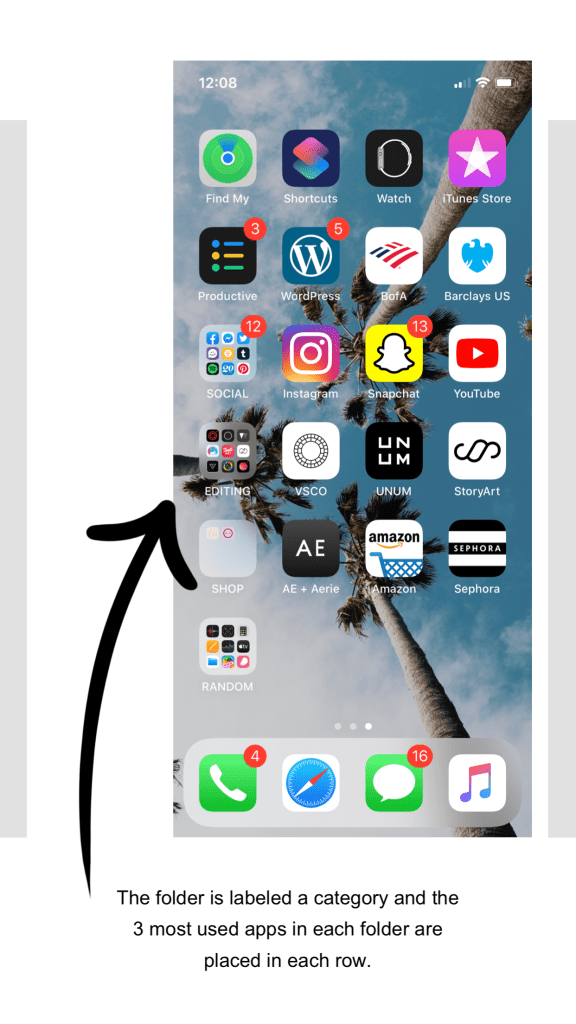
I kept the first row the same just to keep it simple. I rearranged the second row and put my 4 most used apps. And then the next row is where the folders start. For the folder labeled random, I chose to keep those 3 spots empty. Their weren’t any apps in that folder that I use everyday to take out but I figured that it does leave me space to adjust anything like add/delete apps without having to start over. Or if I want to change up that specific folder.
For my home page, I deleted the Home and Books app. I moved the Stocks and TV app into the Random folder. And then I moved the Contacts and Google Maps app from the 2nd page to my home page. Makes this page so much more put together.

That would make my phone somewhat organized. This was actually a lot more difficult to do than I expected. But totally worth the effort. I mean if you have time then it doesn’t hurt to try. And this motivates me to want to organize everything else in my life. I hope this inspires your organization kick.
What should we organize next?
 Sincerely Salty Hair